Product snapshot
Product snapshot
This page summarizes where Acer Nitro XV275K P5biipruzx fits in our buying guides and what to double-check on the retailer listing you are considering.
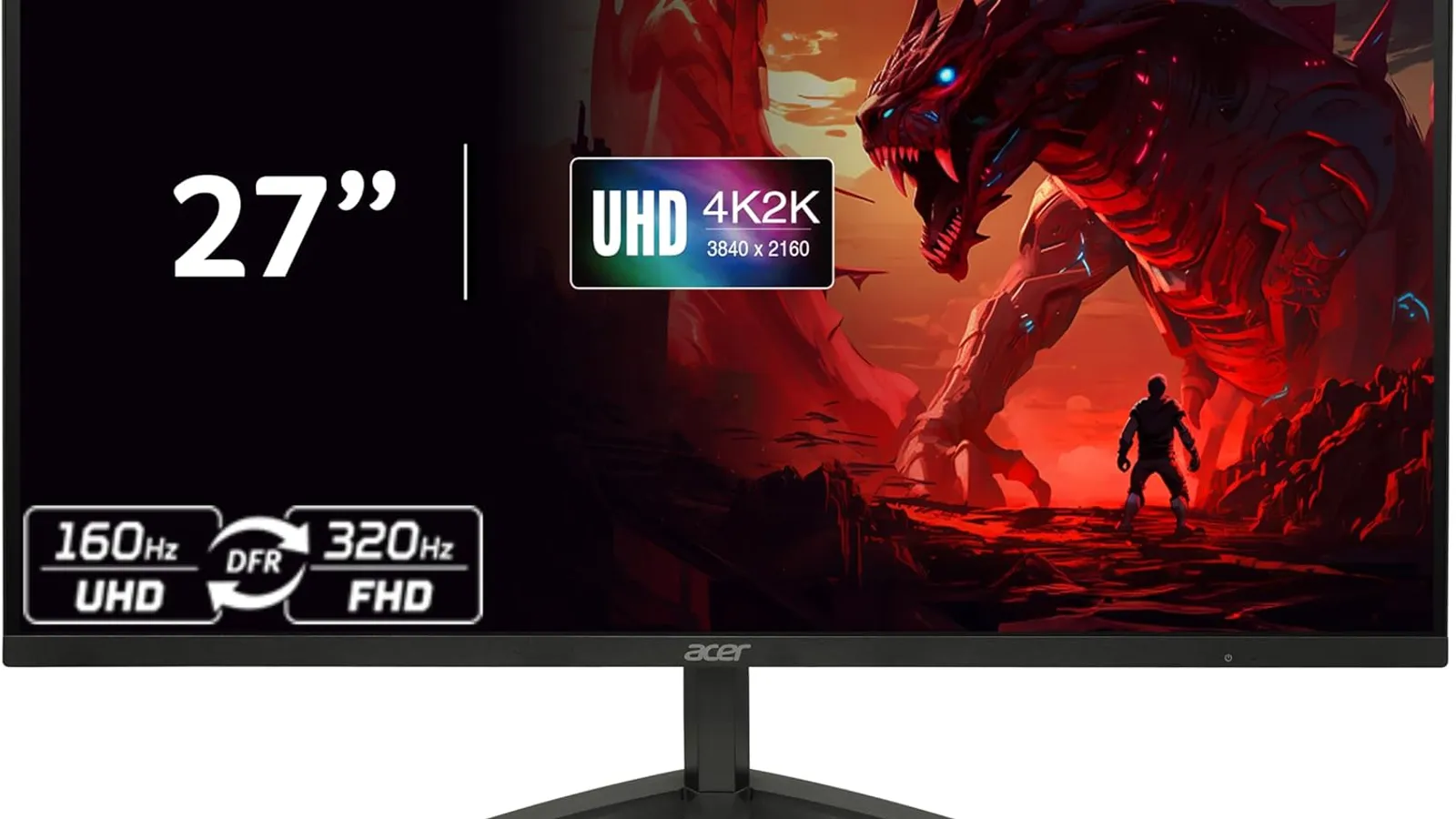
- Brand
- Acer
- Category
- Monitors
- Where you’ll see it
- 2 buying guides
- Main use
- Best lower mid-range 4K HDR gaming monitor
Best lower mid-range 4K HDR gaming monitor
Mini LED brightness and 4K detail without OLED-tier commercial positioning.
Skip it if this caveat matters in your setup: LCD motion/contrast limitations vs OLED. That one detail can matter more than the headline spec.
Buying options
Buying options
Use the full buying guide to compare this product against alternatives before choosing.
Quick read
Quick verdict
This product research note is for shoppers who see Acer Nitro XV275K P5biipruzx on our Best gaming monitors and Best 4K monitors shortlists and want calm desk homework before a storefront listing—not a scored lab review.
Our notes cite Mini LED brightness and 4K detail without OLED pricing when you accept LCD motion and contrast limits versus OLED step-ups. Verify HDR behavior, HDMI bandwidth, and the exact P5biipruzx suffix on the listing you trust.
Pause when OLED motion, deepest blacks, or flagship HDR reference panels drive the decision—compare ASUS ROG Swift OLED PG27UCDM product note and budget IPS or Mini LED lanes before you treat this as the universal best gaming monitor.
At a glance
Product snapshot
- Category: Gaming monitor—value 4K Mini LED on both gaming and 4K buying guides.
- Guide placement: Lower mid-range 4K HDR gaming monitor and upper mid-range 4K LCD when those guides are live.
- Buyer role: PC or console-at-desk shopper who wants 4K sharpness and brighter HDR-style highlights without OLED ownership habits.
- Appears on Better Buy Lab:
- Best Gaming Monitors — Best lower mid-range 4K HDR gaming monitor | Best upper mid-range 4K LCD
- Best 4K Monitors — Best lower mid-range 4K HDR gaming monitor | Best upper mid-range 4K LCD
- monitors/best-budget-gaming-monitors — Listed on this guide.
- monitors — Listed on this guide.
Key buying checks
How to choose the right monitor for work and games
Match resolution, refresh rate, panel type, and ports to your desk depth, graphics hardware, and whether you mostly work, game, or both. Below is how we think about Acer Nitro XV275K P5biipruzx for real rooms and daily use.
Match resolution and size to distance and sharpness
Very high resolution only helps if your GPU and content can use it. Too little resolution for a large screen can look soft when you sit close.
Desks where you care about sharp text and UI at a normal viewing distance.
High pixel density can require OS scaling adjustments; low resolution on a large panel looks soft up close.
Panel size, native resolution, scaling comfort, target game frame rates, and cable bandwidth.
Choose refresh rate your system can actually use
A high refresh rate helps when your PC or console can output matching frame rates and your cables support the signal. Film and casual use may not need the highest numbers.
Fast-paced gaming where you will tune graphics settings to match the display.
A high Hz label does not fix cable limits, capped sources, or GPUs already near their limit.
Target refresh rate, adaptive sync support, HDMI or DisplayPort version, and realistic FPS for your main use.
Choose panel type for your room lighting and use
OLED, IPS, VA, and Mini LED differ in contrast, brightness, glow, maintenance, and HDR behavior. Your window placement and desktop habits matter.
Buyers who know their typical room brightness and whether they run static content for long periods.
A panel praised for dark-room use may be a poor fit for an all-day bright office.
Lighting, static content habits, HDR goals, viewing angles, and any maintenance you accept.
Check stand depth, VESA, and cable paths
Deep feet, tight curves, or awkward rear ports reduce usable space for keyboard, mouse, and speakers.
Shallow desks, monitor arms, shared workspaces, or tight speaker placement.
Skipping depth measurements can crowd the keyboard or block shelving.
Footprint, height and tilt range, VESA pattern, port direction, and cable routing.
Check ports and cables before you buy
Port type and cable spec limit refresh, resolution, and charging. Assume USB-C display features are spelled out in the spec sheet.
Laptops, docks, desktops, and consoles on one desk.
Not every USB-C port carries the same video, power delivery, or data capability.
HDMI, DisplayPort, USB-C alt mode, cable labels, charger wattage, and whether the USB hub is useful.
Confirm the exact model before you buy
Model names, regions, and bundles change what is in the box. Check the manufacturer page for your country, the seller listing, warranty text, and which accessories are included.
Buyers who shop online and need the shipment to match the configuration they selected.
Small naming differences can mean different ports, stands, or power adapters between regions.
SKU, country variant, return window, warranty, and that photos match the product you add to the cart.
When headline specifications miss real-world limits
A strong specification can still disappoint if glare, noise, edge cleaning, or return terms do not fit how you use the product.
Buyers who want to compare trade-offs before deciding.
Marketing often assumes ideal conditions; your room, hearing, or layout may differ.
Return policy, upkeep (filters, bags, mop pads), physical fit in the space, and whether the downsides are acceptable.
Buyer scenarios
A few ways shoppers land here
- Value 4K gamer: You want 4K detail and useful HDR brightness without paying flagship OLED money—if LCD motion trade-offs are acceptable.
- Mixed work plus gaming: Spreadsheets, streaming, and play share one 27-inch desk and you will confirm text scaling on the listing.
- Console-at-desk shopper: HDMI 2.1 bandwidth and VRR wording matter for PS5 or Xbox—you will verify ports on the seller page.
- OLED comparison shopper: You are weighing XV275K against AW2725Q, PG27UCDM, or budget AW2725DM / AOC lanes before checkout.
These moments describe shopper intent—we are not asserting measured frame pacing or adaptive-sync quirks for every GPU stack.
Need sibling picks in plain language next? Jump to Best 4K Monitors after you jot desk measurements.
Where it fits in the monitor cluster
XV275K is the value 4K Mini LED lane on our gaming and 4K shortlists—not the flagship OLED motion pick or the cheapest IPS desk panel.
- Parent guide: Best gaming monitors — lower mid-range 4K HDR gaming monitor lane.
- 4K desk fork: Best 4K monitors — upper mid-range 4K LCD value when pixel density matters.
- Monitors hub: Monitor buying guides — branch among gaming, budget, and 4K lanes.
- OLED or budget fork: ASUS ROG Swift OLED PG27UCDM product note — flagship 4K QD‑OLED step-up.
- OLED or budget fork: Dell Alienware AW2725Q product note — 4K QD‑OLED value lane.
- OLED or budget fork: Dell Alienware AW2725DF product note — mid-range 1440p OLED sibling.
- OLED or budget fork: AOC Q27G3XMN product note — budget Mini LED contrast lane.
- OLED or budget fork: Dell Alienware AW2725DM product note — budget IPS gaming lane—not OLED.
Where it fits
These lanes describe who usually arrives from our gaming and 4K monitor guides when value Mini LED leads—not a verdict on your desk without HDMI and GPU checks.
- Value 4K Mini LED: You want 4K sharpness and HDR-style brightness without OLED pricing when LCD motion limits are acceptable.
- Mixed desk: Productivity, streaming, and gaming share one panel and you will confirm scaling and static-content habits.
- Console or PC hybrid: You need HDMI 2.1 and VRR behavior spelled out for each source on the listing.
- Comparison shopper: You are cross-reading OLED and budget monitor notes before you lock spend.
Highlights to confirm
Carry these highlights to the storefront listing—treat them as reminders, not benchmark printouts.
- Mini LED brightness and 4K detail without OLED-tier commercial positioning.
- Mini LED HDR, 4K sharpness, strong mixed-use value.
Trade-offs to double-check
- Skip it if this caveat matters in your setup: LCD motion/contrast limitations vs OLED. That one detail can matter more than the headline spec.
- Skip it if this caveat matters in your setup: Not OLED-level motion or blacks. That one detail can matter more than the headline spec.
What to check before choosing
Walk desk-side with measuring tape plus GPU or console already known.
- Exact model suffix on the carton and seller title: Nitro XV275K P5biipruzx / UM.HX5AA.501 class wording—not a different Nitro size, panel year, or regional substitute unless intended.
- HDMI 2.1 port count and bandwidth claims for your PC or console—confirm on the listing, not from generic Nitro marketing alone.
- VRR and game-mode wording for the sources you plug in; firmware notes can differ by region.
- Refresh rate and resolution table for the modes you will actually use at 4K.
- Mini LED local-dimming behavior in dark scenes versus OLED siblings you still have on the shortlist.
- Desk depth, stand footprint, and VESA arm compatibility before you assume a shallow laminate fits.
- Warranty, return policy, and seller accuracy—third-party, renewed, and open-box titles change what arrives.
Fit filter
Choose if / Skip if
Pair these bullets with refreshed listings—we keep them succinct on purpose.
Choose if
- Value 4K Mini LED fits your budget and you will verify the P5biipruzx model suffix on the listing.
- LCD motion and contrast trade-offs versus OLED are acceptable for your game mix and desk habits.
- HDMI bandwidth and refresh claims still match your GPU or console after you read the seller page.
- Mini LED HDR brightness matters more than OLED-level blacks for your room lighting.
Skip if
- OLED motion and deepest blacks are the priority—read PG27UCDM, AW2725Q, or AW2725DF notes first.
- You need the lowest desk spend—budget IPS or Mini LED lanes may fit better.
- You will not verify model suffix, ports, or return policy before checkout.
- Flagship HDR reference or burn-in-free static-desktop habits require OLED or IPS paths instead.
Stay on-site next
Alternatives & related guides
Bounce across monitors desks and peripherals without leaving Better Buy Lab.
- Monitors hub — branch among gaming, budget, and 4K lanes.
- Best gaming monitors — primary shortlist where this model appears today.
- Best 4K monitors when pixel density drives the decision.
- Best budget gaming monitors for the value lane on our desk.
- Best mechanical keyboards when you rethink inputs alongside pixel response.
- Best wireless gaming mouse because pointer feel and desk clutter matter paired with monitors.
- ASUS ROG Swift OLED PG27UCDM product note — flagship 4K QD‑OLED step-up.
- Dell Alienware AW2725Q product note — 4K QD‑OLED value lane.
- Dell Alienware AW2725DF product note — 1440p OLED mid-range sibling.
- AOC Q27G3XMN product note — budget Mini LED lane.
- Dell Alienware AW2725DM product note — budget IPS gaming lane.
- Monitors category for every monitors guide in this aisle.
FAQ
FAQ
Is the Acer Nitro XV275K P5biipruzx still worth it?
For value-focused shoppers on our gaming and 4K shortlists, it remains the practical Mini LED lane when 4K detail and HDR brightness beat OLED pricing—still confirm the exact suffix and seller listing. We do not track live deals here.
Is XV275K good versus OLED gaming monitors?
Choose XV275K when Mini LED brightness and 4K value beat OLED motion and contrast for your budget. Choose ASUS PG27UCDM or AW2725Q when OLED habits and GPU headroom justify the step-up—read those notes and our guides before you decide.
How does XV275K compare to AW2725Q or PG27UCDM?
XV275K is the LCD Mini LED value lane; AW2725Q and PG27UCDM are QD‑OLED step-ups with different motion and static-content habits. None are interchangeable SKUs—verify ports and model names on each listing.
Is XV275K good for PS5 or Xbox at a desk?
Our guides cite it for console-at-desk buyers when HDMI 2.1 and VRR claims on the listing match your console—confirm game-mode behavior and port count on the seller page, not from this note alone.
What should I check before buying XV275K?
Confirm P5biipruzx / UM.HX5AA.501 class wording, HDMI 2.1 count, VRR support, desk depth, VESA needs, warranty, and that the listing is new—not renewed or open-box—using the checklist below.
Does Better Buy Lab show live prices on this page?
No. This product note is informational. Shopping links and price callouts appear only on buying guides after product and retailer details are checked—not on this standalone page.
Editorial transparency
Better Buy Lab uses this page as a product context note linked from our monitors buying guides—especially Best gaming monitors. It supports shortlist reading; it is not a scored review or a storefront.
We describe fit using guide-level notes and shopper checklists. We do not claim independent lab measurements or calibrated panel benches performed by Better Buy Lab. Notes refresh when listings evolve. Approved affiliate links appear only on designated monitor buying guides with reader-visible disclosure—not on this product note. You will not find live prices, shipment promises, shopping buttons, or star-style ratings on this page.
In our guides
Buying guides referencing this SKU today.
Best 4K Monitors
Best lower mid-range 4K HDR gaming monitor | Best upper mid-range 4K LCD
Best Gaming Monitors
Best lower mid-range 4K HDR gaming monitor | Best upper mid-range 4K LCD