Product snapshot
Product snapshot
This page summarizes where Razer Pro Type Ultra fits in our buying guides and what to double-check on the retailer listing you are considering.
- Brand
- Razer
- Category
- Keyboards
- Where you’ll see it
- 1 buying guide
- Main use
- Best office-friendly upper mid-range keyboard
Best office-friendly upper mid-range keyboard
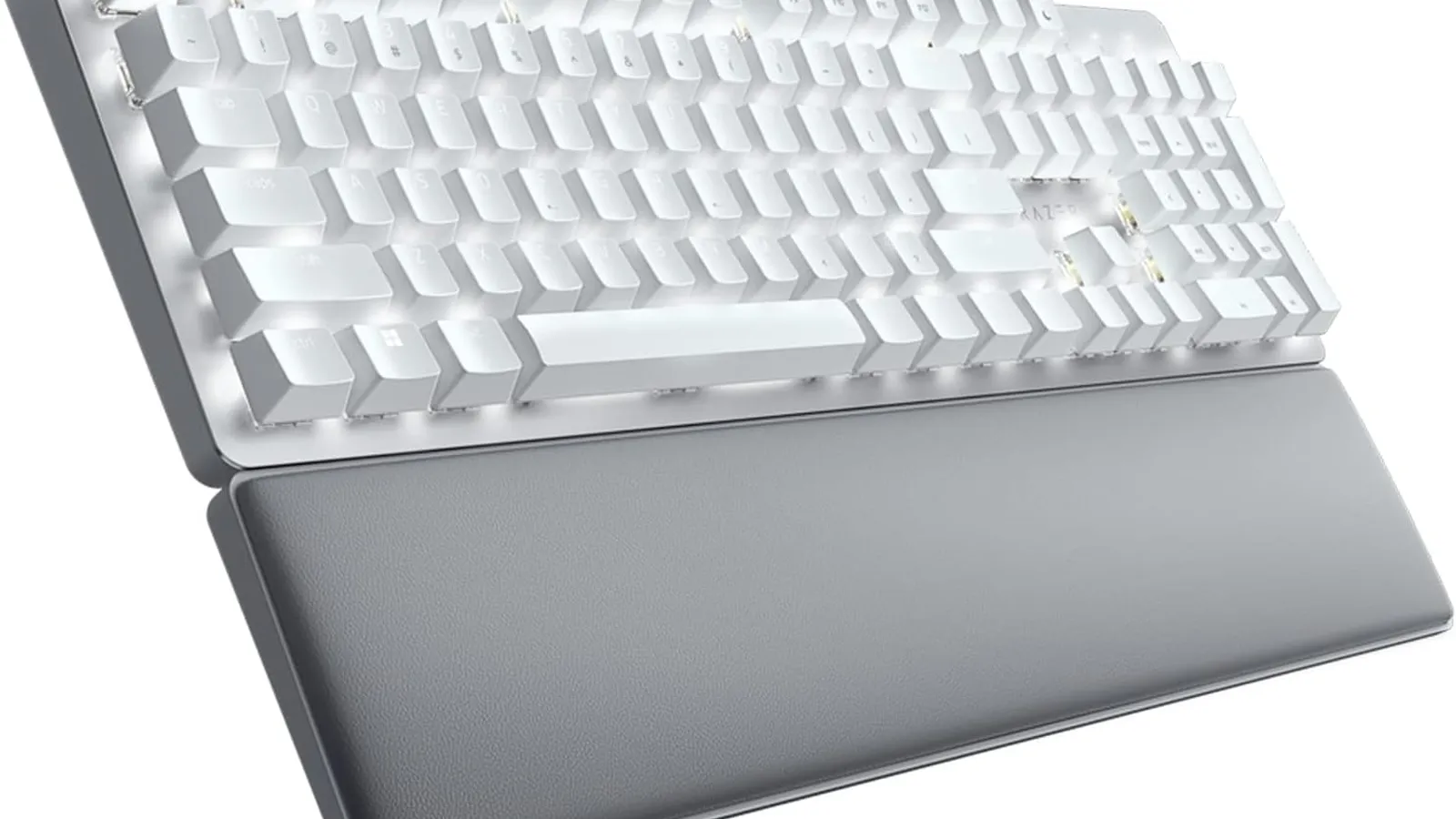
Clean design, wrist rest, quiet linear switches, wireless support, and strong dual office/gaming appeal.
Skip it if less customizable and uses ABS keycaps.
Buying options
Buying options
This page does not show live prices. Use the retailer listing to verify the exact model, size, color, bundle, and return policy before buying.
Quick read
Quick verdict
This product research note is for shoppers who see Razer Pro Type Ultra on our Best mechanical keyboards shortlist as the Best office-friendly upper mid-range keyboard pick—not a scored lab review.
- Consider: clean design, wrist rest, quiet linear switches, and wireless support with less customization depth per our notes.
- Pause: Read caveats on our product sheet and verify listing SKU, bundle contents, and return policy before checkout.
- No lab claims: Better Buy Lab does not independently measure performance here—use guide narrative plus listing facts you verify.
At a glance
Product snapshot
- Shortlist role: Best office-friendly upper mid-range keyboard on Best mechanical keyboards.
- Appears on Better Buy Lab:
- Best Mechanical Keyboards — Best office-friendly upper mid-range keyboard
- keyboards — Listed on this guide.
Key buying checks
How to choose a mechanical keyboard you will type on daily
Layout, switch feel, wired or wireless needs, and case quality matter more than lighting features. Below is how we think about Razer Pro Type Ultra for real rooms and daily use.
Layout versus keys you use daily
Compact boards save space but may hide punctuation or arrows behind function layers.
Users who know which keys they need for work and travel.
Missing numpad or arrow cluster frustrates spreadsheet and navigation workflows.
Numpad need, arrow keys, function row, travel size constraints.
Switch feel and noise for your environment
Clicky switches are distracting in open offices; hot-swap boards let you change switches later.
Typists who care about tactile feedback and noise limits.
Soldered budget boards lock you into one switch type.
Switch family, noise ceiling, hot-swap support, dampening options.
Wired reliability versus wireless convenience
Bluetooth suits light office use; low-latency wireless or wired suits fast-paced games.
Users who switch between laptop and desktop often.
Some models need software for basic remapping or lighting.
Latency needs, dongle storage, Bluetooth limitations, software dependency.
Case stiffness and typing angle
Flex and hollow sound affect long sessions; adjustable feet or a separate wrist rest may help.
Writers and developers on multi-hour sessions.
Sharp edges or slippery feet reduce comfort even with good switches.
Case material, default angle, aftermarket rest needs, flex in reviews.
Confirm the exact model before you buy
Model names, regions, and bundles change what is in the box. Check the manufacturer page for your country, the seller listing, warranty text, and which accessories are included.
Buyers who shop online and need the shipment to match the configuration they selected.
Small naming differences can mean different ports, stands, or power adapters between regions.
SKU, country variant, return window, warranty, and that photos match the product you add to the cart.
When headline specifications miss real-world limits
A strong specification can still disappoint if glare, noise, edge cleaning, or return terms do not fit how you use the product.
Buyers who want to compare trade-offs before deciding.
Marketing often assumes ideal conditions; your room, hearing, or layout may differ.
Return policy, upkeep (filters, bags, mop pads), physical fit in the space, and whether the downsides are acceptable.
Buyer scenarios
Common reasons readers open this note
- Office-first mechanical: You want wireless convenience and quieter linear switches for hybrid work.
- Dual office and gaming: Clean design still fits evening game sessions without loud click switches.
- Wrist rest planner: Included rest must cooperate with your chair and monitor stack.
- Customization pause: You accept ABS keycaps and less hot-swap depth versus enthusiast boards.
Intent snapshots only—we do not claim independent switch force curves or wireless latency charts for every desk.
After layout and switch notes below, return to Best Mechanical Keyboards for sibling picks on our mechanical keyboards shortlist.
Where it fits in the keyboard cluster
Razer Pro Type Ultra is the office-friendly upper mid-range lane—clean design, wrist rest, quiet linear switches, and wireless support with less customization depth per our notes.
- Parent guide: Best mechanical keyboards — Best office-friendly upper mid-range keyboard lane.
- Category hub: Keyboard buying guides — sibling lanes and forks.
Where it fits
These lanes describe who usually arrives from our mechanical keyboards guide when best office-friendly upper mid-range keyboard fits—not a verdict without layout and switch checks.
- Office-first mechanical: You want wireless convenience and quieter linear switches for hybrid work.
- Dual office and gaming: Clean design still fits evening game sessions without loud click switches.
- Wrist rest planner: Included rest must cooperate with your chair and monitor stack.
- Customization pause: You accept ABS keycaps and less hot-swap depth versus enthusiast boards.
Highlights to confirm
Straight from our product sheet copy—bring it while cross-checking the manufacturer storefront.
- Clean design, wrist rest, quiet linear switches, wireless support, and strong dual office/gaming appeal.
Trade-offs to double-check
- Skip it if less customizable and uses ABS keycaps.
What to check before choosing
Use this checklist with tape measures, switch samples, and docking gear nearby.
- Exact model: Razer Pro Type Ultra wording—not Huntsman, BlackWidow, or bundle color swaps unless intended.
- Included wrist rest and whether ergonomics fit your monitor height.
- Quiet linear switch noise tolerance for shared desks and call-heavy days.
- Wireless dongle, Bluetooth pairing, and battery habits on the listing.
- ABS keycap caveat in our sheet—verify shine tolerance and replacement keycap plans.
- Razer Synapse or mobile app requirements for your OS versions.
- Warranty, return policy, and seller accuracy on the storefront you trust.
Fit filter
Choose if / Skip if
Choose if
- Our mechanical keyboards shortlist cites Razer Pro Type Ultra when listing layout, switches, and wireless habits still match your desk.
- You will verify SKU, hot-swap or software needs, and return policy before checkout.
- Guide-level caveats in our product sheet still fit your typing and gaming mix.
Skip if
- Primary caveats in our product sheet disqualify your desk, noise, or budget without a sibling pick.
- You need ultralight travel boards or near-silent open-office etiquette without damping work.
- You will not verify model wording, layout size, or seller listing before purchase.
Stay oriented
Alternatives & related guides
- Keyboards hub — mechanical lists and desk guidance.
- Best mechanical keyboards — shortlist that cites this SKU.
- Best wireless gaming mouse — balance pointer weight with keyboard stability.
- Best gaming monitors — display motion beside your typing platform.
- Logitech G PRO X SUPERLIGHT 2 product note — proven lightweight wireless esports silhouette.
- Razer Viper V3 Pro product note — upper mid-range FPS wireless lane.
- Logitech G502 X PLUS product note — multi-genre programmable-button lane.
- Keychron Q5 Max product note — premium mechanical keyboard desk anchor.
- Keychron V1 Ultra 8K product note — budget mechanical polling emphasis lane.
- MCHOSE L7 Pro product note — lower mid-range lightweight mouse lane.
- Logitech G305 LIGHTSPEED product note — budget wireless gaming mouse lane.
- Logitech G PRO X2 SUPERSTRIKE product note — overall wireless pick with adjustable click actuation.
FAQ
FAQ
Is Razer Pro Type Ultra good for office work?
Our guide cites clean design, wrist rest, quiet linear switches, and wireless support for dual office and gaming appeal—still confirm noise for coworkers.
Pro Type Ultra vs Logitech G715?
Choose Pro Type when office-friendly quiet linears and wrist rest fit. Choose G715 when aesthetic wireless gaming styling and switch options beat Razer customization limits.
Are ABS keycaps a problem?
Our product sheet flags less customization and ABS keycaps. Decide upfront whether shine and limited swap depth matter for your desk timeline.
Is Pro Type Ultra good for gaming?
It can serve mixed desks when wireless stability and linear switches match your titles—not a specialized HE or compact FPS board by default.
What should I check before buying?
Confirm Pro Type Ultra SKU, wrist rest fit, switch noise, wireless modes, software requirements, and seller using the checklist below.
Does Better Buy Lab show live prices?
No. When this model is eligible, the Buying options section includes a disclosed retailer link. We still do not show live prices or star-style ratings on this page.
Does Better Buy Lab show live prices on this page?
No. Shopping links and price callouts arrive only after product details and retailer paths are checked—we keep pages informational until that work finishes.
Editorial transparency
Better Buy Lab uses this page as a product context note linked from our mechanical keyboards buying guides. It supports shortlist reading; it is not a scored review or a storefront.
We describe fit using guide-level notes and shopper checklists. We do not claim independent lab measurements performed by Better Buy Lab. No live prices, shopping buttons, or star-style ratings appear here.
In our guides
Buying guides referencing this SKU today.
Best Mechanical Keyboards
Best office-friendly upper mid-range keyboard